15. Regression assumptions and diagnostics
Module items
R Script file code
-
[[Copy the code]] below ➜ Paste into [[RStudio console]] ➜ Hit Enter
-
source(url("https://raw.githubusercontent.com/ttezcann/ssric-reg/refs/heads/main/docs/assets/attachments/data/0-packages-data.R")); (function(f="15-regression-assumptions-diagnostics.R"){if(!file.exists(f)){download.file("https://raw.githubusercontent.com/ttezcann/ssric-reg/refs/heads/main/docs/assets/attachments/modules/15.-regression-assumptions-diagnostics/15-regression-assumptions-diagnostics.R",f,mode="wb");file.edit(f)}else{download.file("https://raw.githubusercontent.com/ttezcann/ssric-reg/refs/heads/main/docs/assets/attachments/modules/15.-regression-assumptions-diagnostics/15-regression-assumptions-diagnostics.R",gsub(".R","-original.R",f),mode="wb");file.edit(gsub(".R","-original.R",f))}})()- When this R script file opens in a new tab, [[Save R script file|save your previous R script file(s)]], and
- Close the previous tabs (R Script files), which you can find later in the [[Files tab]].
- When this R script file opens in a new tab, [[Save R script file|save your previous R script file(s)]], and
-
Lab assignment
Regression analysis assumptions and diagnostics
Sample lab assignment
In this assignment, you will run the exact same codes provided in the R script file without making any changes. Therefore, there’s no sample lab assignment file.
Suggested reading
Hernán, Miguel A., John Hsu, and Brian Healy. 2019. “A Second Chance to Get Causal Inference Right: A Classification of Data Science Tasks.” Chance 32(1):42–49. doi:10.1080/09332480.2019.1579578
Learning outcomes
- Learn the five key assumptions of regression analysis
- Identify the issues posed by homoscedasticity and heteroscedasticity
- Identify the issues posed by multicollinearity
- Identify the issues posed by curvilinear relationships
- Identify the issues posed by non-normally distributed variables
- Identify the issues posed by the lack of 10% minimum threshold
- Learn the diagnostic tools:
- Performance package
- Scatterplot matrix
- Revise a regression model that violates assumptions and compare model diagnostics before and after revision
[[Linear regression assumptions]] - Overview
- Assumption 1:
- Enough sample size for each category of the dummy variables;
- For larger sample sizes (>1,000 people), such as GSS, ensure that the least frequent category of any variable employed (whether outcome or factor) constitutes at least 10% of the sample.
- Enough sample size for each category of the dummy variables;
- Assumption 2:
- The continuous variables used should display approximately normal distribution;
- Most people's values should be clustered around the middle, not at the very high or very low ends.
- The continuous variables used should display approximately normal distribution;
- Assumption 3:
- There needs to be a linear relationship between outcome variable and continuous factor variables;
- This means avoiding a curvilinear relationship, where as one variable goes up, the other initially follows but then starts to go in the opposite direction, or the reverse.
- There needs to be a linear relationship between outcome variable and continuous factor variables;
- Assumption 4:
- Error variance should appear to be homoscedastic;
- We need the size of the errors our model makes to be pretty much the same, no matter what values the factor variables have.
- Error variance should appear to be homoscedastic;
- Assumption 5:
- There should not be a multicollinearity issue;
- A situation where two or more of the independent variables in a regression model are highly correlated with each other.
- There should not be a multicollinearity issue;
Assumption 1: Homoscedasticity
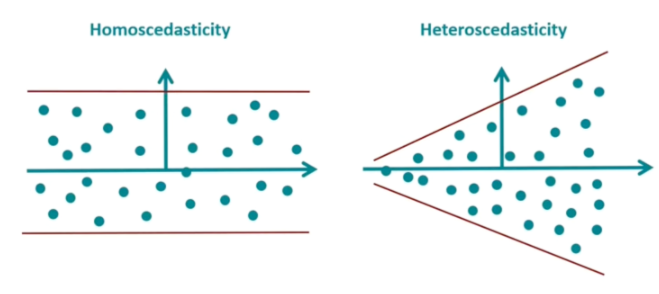
- [[Homoscedasticity]] refers to a situation in statistics where the variability of a variable is consistent across all levels of another variable.
- For linear regression to be accurate, the spread of data points should be uniform across all values of the independent variable.
- Linear regression aims to create a straight-line model that best fits the data.
- Several reasons cause this [[heteroscedasticity]] issue:
- Outliers: Extreme values in data can lead to heteroscedasticity.
- Nonlinear relationships: When the relationship between the independent and dependent variables is nonlinear (i.e., curvilinear), it can lead to heteroscedasticity.
-
Omitted variables: If important variables are omitted from the regression model, they can lead to heteroscedasticity.
-
Addressing the heteroscedasticity
- For this module, we will address the heteroscedasticity issue by removing the problematic variables from the model.
-
Assumption 2: Multicollinearity
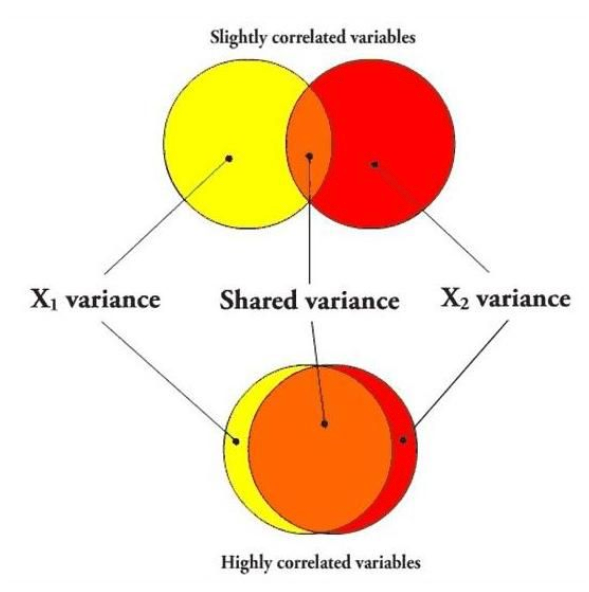
- [[Multicollinearity]] occurs when two or more variables in a regression model are dependent upon the other variables in such a way that one can be linearly predicted from the other with a high degree of accuracy.
- In multicollinearity, two or more of the factor variables correlate strongly with each other.
- Several solutions exist for [[multicollinearity]] issue:
- Removing one of the strongly correlated variables
- Creating an index variable using strongly correlated variables
- Centering variables (subtracting the mean value from each observation)
-
Lasso regression (L1 Regularization)
-
Addressing the multicollinearity issue
- For this module, we will address the multicollinearity issue by removing one of the strongly correlated variables from the model.
-
- In multicollinearity, two or more of the factor variables correlate strongly with each other.
Assumption 3: Linear relationship
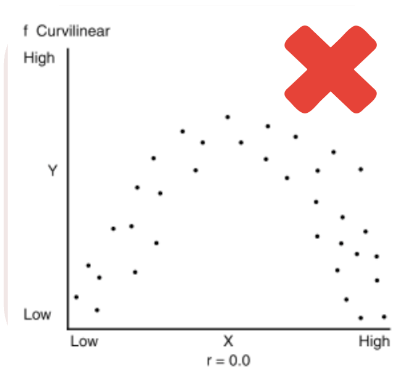
- The term "[[linearity]]" in linear regression refers to the expected linear relationships in the coefficients, meaning the one-unit increase/decrease in the factor variable causes increase/decrease in the outcome variable.
- [[Curvilinear relationship]] between continuous factor and outcome variables violate linear regression assumptions.
- Several solutions exist for [[curvilinear relationship]] issue:
- Recoding the variable into categorical
- Polynomial regression
- Adding interaction terms
-
Rescaling or standardizing variables (converting them to z-scores)
-
Addressing the curvilinear relationship
- For this module, we will address the curvilinear relationship issue by removing the problematic variables from the model.
-
- [[Curvilinear relationship]] between continuous factor and outcome variables violate linear regression assumptions.
Assumption 4: Normal distribution
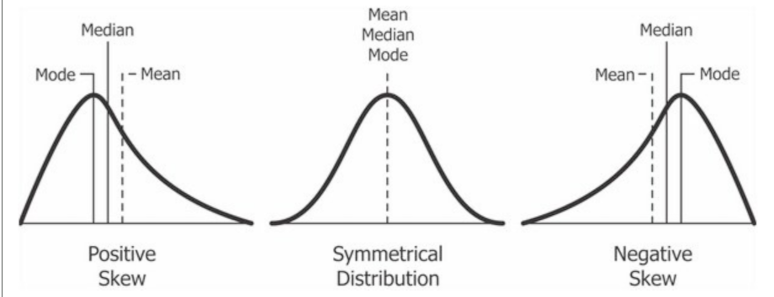
- The continuous variables used should display approximately [[normal distribution]].
-
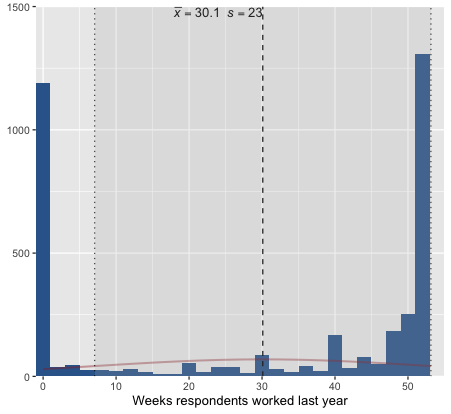
For example, this kind of variables should not be treated as continuous due to the distribution shape:
-
-
Several solutions exist for [[nonnormal distribution]] issue:
- Recoding the variable into categorical
- Logarithmic transformation (log(x))
- Square root transformation (sqrt(x))
- Inverse transformation (1/x)
-
Adding Polynomial terms (x^2)
-
Addressing the nonnormal distribution
- For this module, we will address the nonnormal distribution issue by removing the problematic variables from the model.
-
Assumption 5: At least 10% of the cases
-
The least frequent response category should have at least [[10% of the cases]].
- Before creating dummy variables, we check the frequency distributions to make sure there are at least 10% of the cases in each category.
-
Let's check the frequency table of
classvariable.- We cannot create dummy variables for each response category. "Upper class" has 4.13%
-
-
Respondents' subjective class identification (Variable label)
-
value value label frq raw.prc valid.prc cum.prc 1 Lower class 446 11.19 11.31 11.31 2 Working class 1587 39.81 40.25 51.56 3 Middle class 1747 43.83 44.31 95.87 4 Upper class 163 4.09 4.13 100.00 5 No class 0 0.00 0.00 100.00 NA NA 43 1.08 NA NA
-
-
-
Several solutions exist for having less than [[10% of the cases]] issue:
- Removing the variable from the model
- Collapsing the rare category into an adjacent one (e.g., merging "Upper class" with "Middle class")
- Dropping cases in the rare category from the sample (use cautiously; may introduce bias)
- Treating the variable as continuous if it is ordinal and the distribution is otherwise reasonable
GSS example: Predicting social life index score
-
We'll use [[computing]] to create an [[index variable]] for our outcome variable,
sociallife_index.-
flowchart LR
subgraph C0[Factor variables]
    direction TB
    A[Respondents' socio-economic index score]
    B[Respondents' education in years]
    D[Respondents' personal income]
    F[Respondents' family income]
    G[Respondents' occupational prestige score]
    H[Number of children respondents have]
    I[Level of finding life exciting]
end
subgraph O0[Outcome variable - Index]
    E[Social life index score<br><br> The mean of: <br><br>  1: Frequency of social evening with relatives <br><br> 2: Frequency of social evening with neighbors]
end
A -.->|May affect| E
B -.->|May affect| E
D -.->|May affect| E
F -.->|May affect| E
G -.->|May affect| E
H -.->|May affect| E
I -.->|May affect| E
-
-
The first two variables are to create
sociallife_indexvariable.-
Variable name Variable label Variable type Question wording and response categories socrelFrequency of social evening with relatives Ordinal ✅ RECODE How often do you spend a social evening with relatives?
(1: Almost daily; 2: Once or twice a week; 3: Several times a month; 4: About once a month; 5: Several times a year; 6: About once a year; 7: Never)socommunFrequency of social evening with neighbors Ordinal ✅ RECODE How often do you spend a social evening with neighbors?
(1: Almost daily; 2: Once or twice a week; 3: Several times a month; 4: About once a month; 5: Several times a year; 6: About once a year; 7: Never)educRespondents' education in years Continuous What is the highest year of school you completed?
(Min: 0, Max: 20)conincRespondents' family income Continuous What is your family income in dollars?
(Min: $281.5, Max: $139,024.4)conrincRespondents' personal income Continuous What is your income in dollars?
(Min: $281.5; Max, $123,761.9)prestg10Respondents' occupational prestige score Continuous Respondent's occupational prestige score (calculated)
(Min: 16, Max: 80)childsNumber of children respondents have Continuous How many children do you have?
(Min: 0, Max: 8)life
From: Variables in GSSLevel of finding life exciting Ordinal, RECODE In general, do you find life exciting, pretty routine, or dull?
(1: Exciting; 2: Routine; 3: Dull)
-
[[Recoding]] and [[computing]] #code
-
[[Working code]]
-
- [[Find this working code in the R script file]].
- [[Highlighting and running]] this code will create three more variables.
- [[Find this working code in the R script file]].
-
[[Dummy variable]] #code
-
[[Working code]]
-
- [[Find this working code in the R script file]].
- [[Highlighting and running]] this code will create three more variables.
- [[Find this working code in the R script file]].
-
[[Linear regression]] #code (Model 1)
-
[[Working code]]
-
- [[Find this working code in the R script file]].
- [[Highlighting and running]] this code will generate the output below (which will appear in the [[viewer tab]] of RStudio).
- [[Find this working code in the R script file]].
-
[[Linear regression]] #output (Model 1)
-
Social life index score
-
Factors Coeff. std. Coeff. p (Intercept) 3.69
(0.34)-0.00
(0.03)0.001*** Respondents' socio-economic index score 0.00
(0.00)0.04
(0.07)0.505 Respondents' education in years -0.04
(0.02)-0.07
(0.04)0.076 Respondents' personal income 0.00
(0.00)0.00
(0.05)0.950 Respondents' family income -0.00
(0.00)-0.06
(0.05)0.254 Respondents' occupational prestige score -0.00
(0.01)-0.03
(0.06)0.618 Number of children respondents have 0.02
(0.03)0.02
(0.04)0.537 Finding life exciting 1.02
(0.22)0.36
(0.08)0.001*** Finding life routine 0.40
(0.21)0.15
(0.08)0.056 Observations 794 R² / R² adjusted 0.062 / 0.052
-
[[Linear regression]] #interpretation (Model 1)
-
Linear regression interpretation sample
-
First section: The significance levels
- Finding life exciting is a statistically significant factor of social life index score since the p value is less than 0.05. Respondents' socio-economic index score, respondents' education in years, respondents' personal income, respondents' family income, respondents' occupational prestige score, number of children respondents have, and finding life routine are not statistically significant factors social life index score since the p value is greater than 0.05.
-
Second section: The explanation of coefficients
- Finding life exciting increases social life index score by 1.02 points compared to finding life dull.
-
Third section: The explanation of standardized coefficients
- The strongest factor of social life index score is finding life exciting (std. Coeff=0.36).
- Fourth section: The explanation of adjusted R-squared
- The adjusted R squared value indicates that 5.2% of the variation in social life index score can be explained by finding life exciting.
-
Assessing the assumptions
[[Performance diagnostic]] #code
-
[[Working code]]
-
- This code will display general problems for the first three assumptions
- [[Find this working code in the R script file]].
- [[Highlighting and running]] this code will generate the output below (which will appear in the [[plots tab]] of RStudio).
-
[[Performance diagnostic]] #output
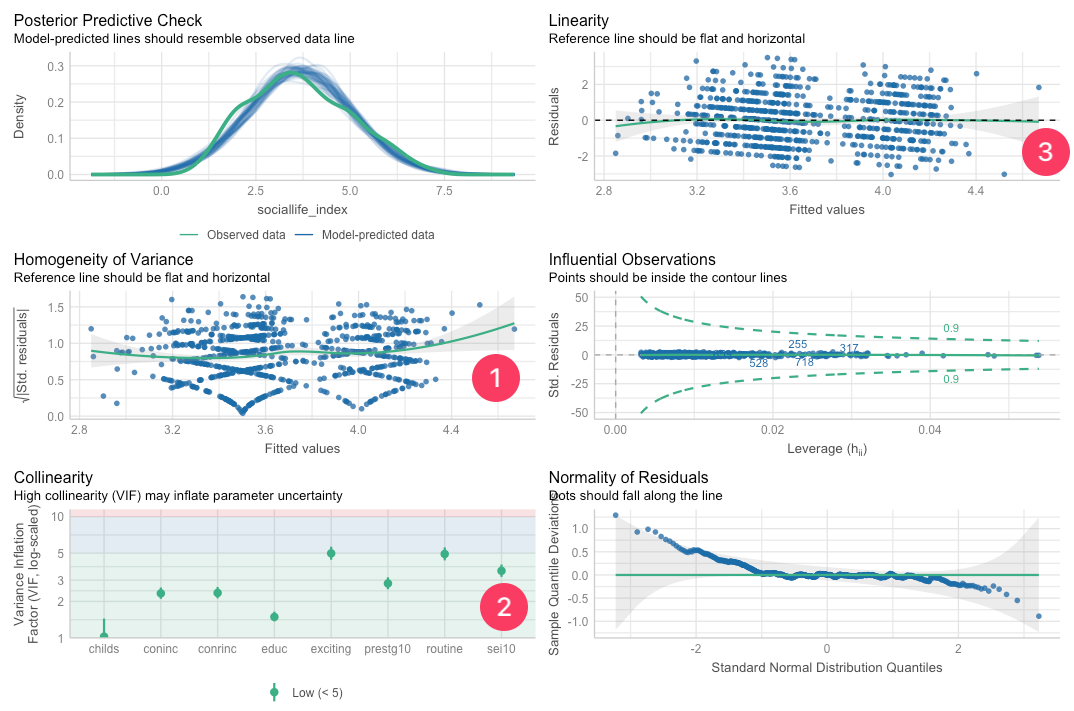
- The output shows:
- Assumption (1) [[Homoscedasticity]] diagnostic
- Assumption (2) [[Multicollinearity]] diagnostic
- Assumption (3) [[Linearity]] diagnostic
- The output shows:
Assumption 1: Homoscedasticity
- Homogeneity of variance (Reference line should be flat and horizontal):
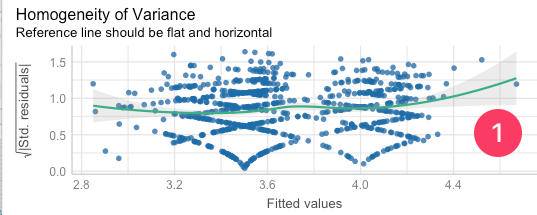
- The current model is not homoscedastic.
- We'll run the following code for more details:
[[Homoscedasticity]] #code (Model 1)
-
[[Working code]]
-
- [[Find this working code in the R script file]].
- [[Highlighting and running]] this code will generate the output below (which will appear in the [[viewer tab]] of RStudio).
- [[Find this working code in the R script file]].
-
[[Homoscedasticity]] #output (Model 1)
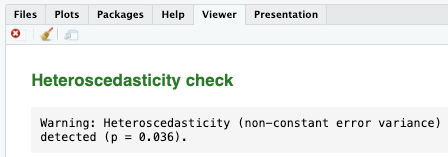
- Since the p-value is less than 0.05, we can confidently conclude that our model exhibits heteroscedasticity, which is not ideal.
Assumption 2: Multicollinearity
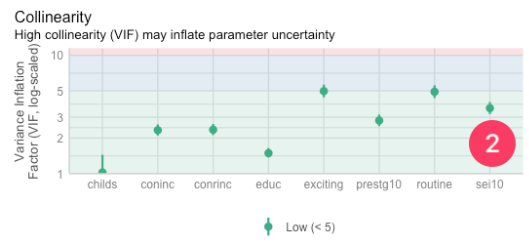
- [[VIF]]:
- The Variance Inflation Factor (VIF) is a measure used to detect the presence and severity of multicollinearity in a regression analysis.
- The ideal value for VIF is close to 2.
- The VIF values of
conincandconrinc, andprestg10andsei10are very close.- We cannot use these pairs in the same model, as they measure almost the same thing.
- We cannot use these pairs in the same model, as they measure almost the same thing.
- We'll run the following code for more details:
[[Multicollinearity]] #code (Model 1)
-
[[Working code]]
-
- [[Find this working code in the R script file]].
- [[Highlighting and running]] this code will generate the output below (which will appear in the [[viewer tab]] of RStudio).
- [[Find this working code in the R script file]].
-
[[Multicollinearity]] #output (Model 1)
-
Term VIF VIF 95% CI adj. VIF Tolerance Tolerance 95% CI sei10 3.58 [3.19, 4.03] 1.89 0.28 [0.25, 0.31] educ 1.49 [1.37, 1.65] 1.22 0.67 [0.61, 0.73] conrinc 2.35 [2.12, 2.63] 1.53 0.43 [0.38, 0.47] coninc 2.33 [2.10, 2.61] 1.53 0.43 [0.38, 0.48] prestg10 2.81 [2.52, 3.16] 1.68 0.36 [0.32, 0.40] childs 1.03 [1.00, 1.44] 1.01 0.98 [0.69, 1.00] exciting 4.98 [4.42, 5.65] 2.23 0.20 [0.18, 0.23] routine 4.92 [4.36, 5.58] 2.22 0.20 [0.18, 0.23] - There are many variables with VIFs higher than 2, which is not ideal.
Assumption 3: Linearity
- Linearity (Reference line should be flat and horizontal):
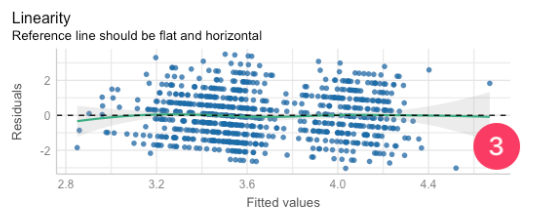
- The reference line is not flat. It curves downward as fitted values increase (it starts above zero on the left, dips below in the middle-right).
- That's a sign of a non-linear pattern in the data that the model isn't capturing well.
- The reference line is not flat. It curves downward as fitted values increase (it starts above zero on the left, dips below in the middle-right).
- To further see this issue, we'll use [[scatterplot graph matrix]].
[[Scatterplot graph matrix]] #code (Model 1)
-
[[Working code]]
-
- [[Find this working code in the R script file]].
- [[Highlighting and running]] this code will generate the output below (which will appear in the [[plots tab]] of RStudio).
- [[Find this working code in the R script file]].
-
[[Scatterplot graph matrix]] #output (Model 1)
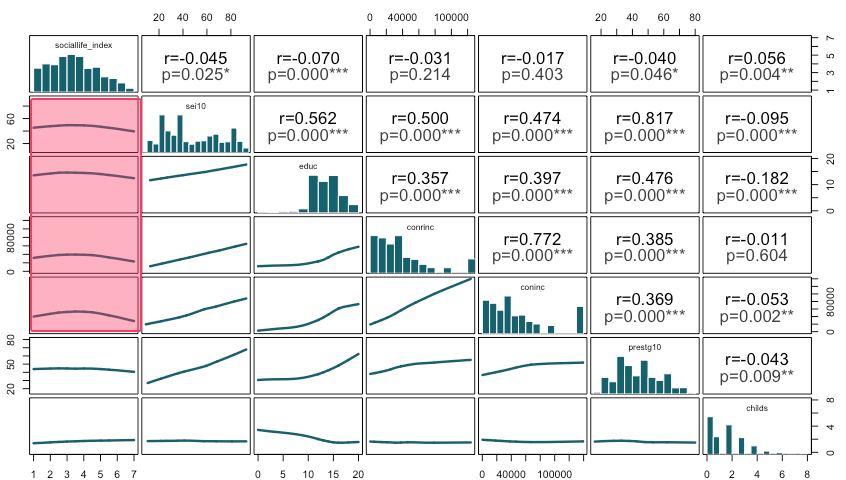
- The scatterplot boxes suggest curvilinear (nonlinear) relationships rather than straight-line trends.
- Specifically the relationships between sociallife_index and the socioeconomic variables (sei10, educ, conrinc, and coninc) do not show linear patterns.
- In other words, increases in socioeconomic status do not translate into proportional increases in social life index score; the relationship appears to change in strength at different levels, which violates the linear relationship assumption.
Assumption 4: Normal distribution
- We'll check [[scatterplot graph matrix]] to see whether the variables violate normal distribution assumption.
[[Scatterplot graph matrix]] #code (Model 1)
-
[[Working code]]
-
- [[Find this working code in the R script file]].
- [[Highlighting and running]] this code will generate the output below (which will appear in the [[plots tab]] of RStudio).
- [[Find this working code in the R script file]].
-
[[Scatterplot graph matrix]] #output (Model 1)
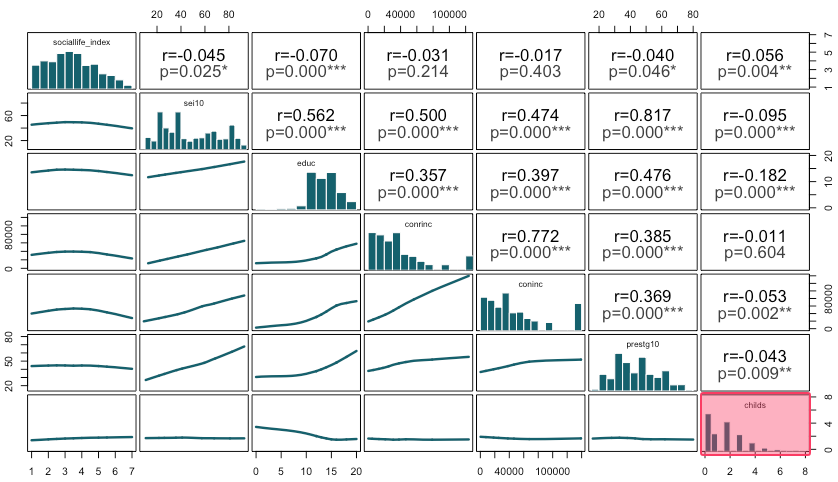
- Histograms look approximately normal, however,
childsis skewed (nonnormal).
- Histograms look approximately normal, however,
Assumption 5: At least 10% of the cases
- We created dummy variables for
lifevariable without checking the frequency distribution.
[[Frequency table]] #code
-
[[Working code]]
-
- [[Find this working code in the R script file]].
- [[Highlighting and running]] this code will generate the output below (which will appear in the [[viewer tab]] of RStudio).
- [[Find this working code in the R script file]].
-
[[Frequency table]] #output
-
Level of finding life exciting
-
value value label frq raw.prc valid.prc cum.prc 1 Exciting 971 24.36 36.42 36.42 2 Routine 1519 38.11 56.98 93.40 3 Dull 176 4.42 6.60 100.00 NA NA 1320 33.12 NA NA - Here the "Dull" category has only 6.6% of the responses (less than 10%).
- We should have merged this category.
- Here the "Dull" category has only 6.6% of the responses (less than 10%).
-
[[Dummy variable]] #code
-
[[Working code]]
-
- [[Find this working code in the R script file]].
- [[Highlighting and running]] this code will create two more variables.
- [[Find this working code in the R script file]].
-
Fixing the model (Model 2)
[[Linear regression]] #code (Model 2)
-
[[Working code]]
-
- [[Find this working code in the R script file]].
- [[Highlighting and running]] this code will generate the output below (which will appear in the [[viewer tab]] of RStudio).
- [[Find this working code in the R script file]].
-
[[Linear regression]] #output (Model 2)
-
Social life index score
-
Factors Coeff. std. Coeff. p (Intercept) 4.01
(0.19)-0.00
(0.03)0.001*** Respondents' education in years -0.04
(0.01)-0.08
(0.03)0.004** Finding life exciting 0.60
(0.08)0.20
(0.03)0.001*** Observations 1313 R² / R² adjusted 0.043 / 0.041
-
[[Linear regression]] #interpretation (Model 2)
-
Linear regression interpretation sample
-
First section: The significance levels
- Respondents' education in years and finding life exciting are statistically significant factors of social life index score since the p value is less than 0.05.
-
Second section: The explanation of coefficients
- One year increase in espondents' education decreases social life index score by 0.04 points. Finding life exciting increases social life index score by 0.60 points compared to finding life dull and routine.
-
Third section: The explanation of standardized coefficients
- The strongest factor of social life index score is finding life exciting (std. Coeff=0.20), followed by respondents' education in years (std. Coeff=-0.08)
- Fourth section: The explanation of adjusted R-squared
- The adjusted R squared value indicates that 4.1% of the variation in social life index score can be explained by respondents' education in years and finding life exciting.
-
Assessing the assumptions
[[Performance diagnostic]] #code (Model 2)
-
[[Working code]]
-
- [[Find this working code in the R script file]].
- [[Highlighting and running]] this code will generate the output below (which will appear in the [[plots tab]] of RStudio).
- [[Find this working code in the R script file]].
-
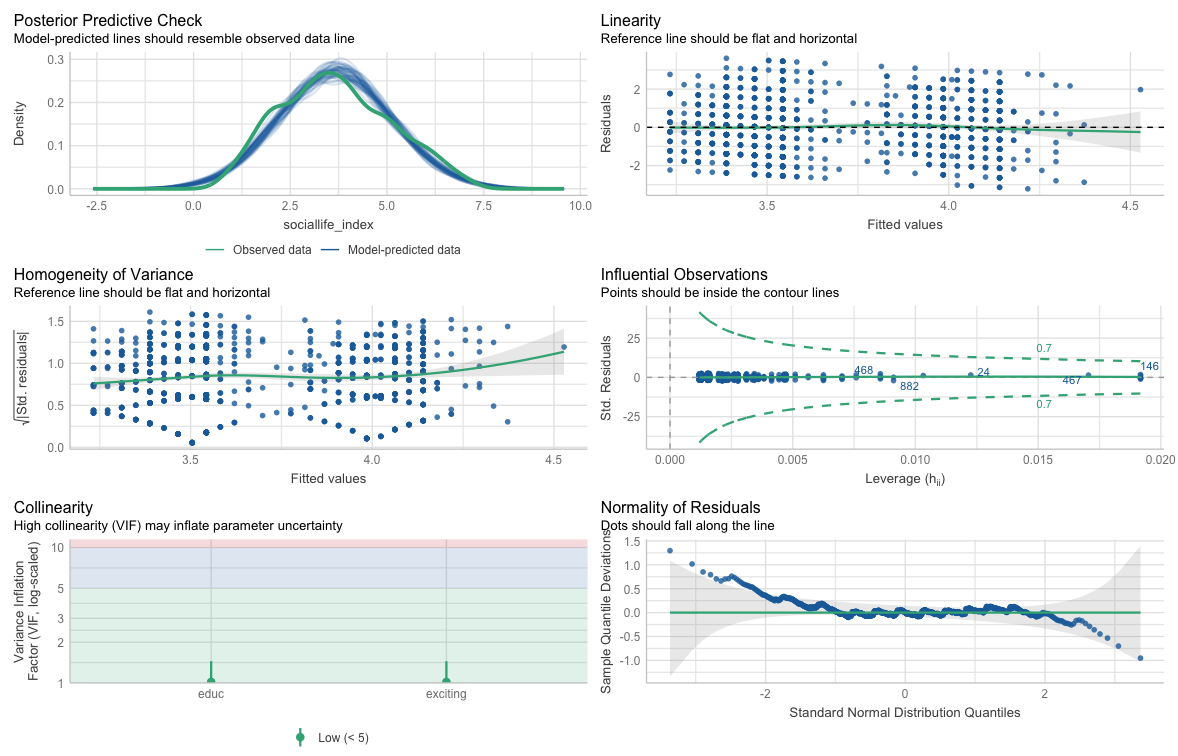
[[Performance diagnostic]] #output (Model 2)
[[Homoscedasticity]] #code (Model 2)
-
[[Working code]]
-
- [[Find this working code in the R script file]].
- [[Highlighting and running]] this code will generate the output below (which will appear in the [[viewer tab]] of RStudio).
- [[Find this working code in the R script file]].
-
[[Homoscedasticity]] #output (Model 2)
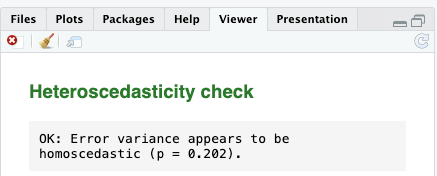
- Since the p-value is higher than 0.05, we can confidently conclude that our model exhibits homoscedasticity, which is ideal.
[[Multicollinearity]] #code (Model 2)
-
[[Working code]]
-
- [[Find this working code in the R script file]].
- [[Highlighting and running]] this code will generate the output below (which will appear in the [[viewer tab]] of RStudio).
- [[Find this working code in the R script file]].
-
[[Multicollinearity]] #output (Model 2)
-
Term VIF VIF 95% CI adj. VIF Tolerance Tolerance 95% CI educ 1.02 [1.00, 1.45] 1.01 0.98 [0.69, 1.00] exciting_new 1.02 [1.00, 1.45] 1.01 0.98 [0.69, 1.00]