13. Logistic regression basics
Module items
R Script file code
-
[[Copy the code]] below ➜ Paste into [[RStudio console]] ➜ Hit Enter
-
source(url("https://raw.githubusercontent.com/ttezcann/ssric-reg/refs/heads/main/docs/assets/attachments/data/0-packages-data.R")); (function(f="13-logistic.R"){if(!file.exists(f)){download.file("https://raw.githubusercontent.com/ttezcann/ssric-reg/refs/heads/main/docs/assets/attachments/modules/13.-logistic-regression-basics/13-logistic.R",f,mode="wb");file.edit(f)}else{download.file("https://raw.githubusercontent.com/ttezcann/ssric-reg/refs/heads/main/docs/assets/attachments/modules/13.-logistic-regression-basics/13-logistic.R",gsub(".R","-original.R",f),mode="wb");file.edit(gsub(".R","-original.R",f))}})()- When this R script file opens in a new tab, [[Save R script file|save your previous R script file(s)]], and
- Close the previous tabs (R Script files), which you can find later in the [[Files tab]].
- When this R script file opens in a new tab, [[Save R script file|save your previous R script file(s)]], and
-
Lab assignment
Sample lab assignment
Suggested reading
Osborne, Jason W. 2015. “A Conceptual Introduction to Bivariate Logistic Regression.” Pp. 1–18 in Best practices in logistic regression. Los Angeles: Sage.
Learning outcomes
- Define logistic regression and identify when it is appropriate (binary outcome variable)
- Identify situations in which logistic regression is appropriate
- Interpret odd ratios (OR) and standardized odd ratios (Std. OR)
- Calculate negative odds ratios to report negative effects in interpretable positive terms
- Interpret the Tjur R-squared value as the proportion of variation in the binary outcome explained by the model
Logistic regression structure
- [[Logistic regression]] is a regression model where;
- The [[outcome variable]] is
- A [[dummy variable]], and thus [[binary]], which can take only two values, "1" and "0", such as,
- pass (1) / fail (0),
- win (1) / lose (0),
- alive (1) / dead (0),
- healthy (1) / sick (0),
- return (1) / stay (0),
- voted (1) / didn’t vote (0).
- Categorical factor variables should also be dummy variable.
- A [[dummy variable]], and thus [[binary]], which can take only two values, "1" and "0", such as,
- The [[outcome variable]] is
-
We are interested in showing how factor variables increase or decrease the odds of the outcome variable happening.
-
For example, we may want to see how hours of studying (continuous factor variable; min: 0, max: 7) increases the odds of passing the exam (dummy outcome variable; 1: passing; 0: failing).
-
flowchart LR
subgraph F["Continuous variable"]
    A[Hours of studying<br><br>min: 0, max: 7]
end

subgraph O["Dummy outcome variable"]
    B[Passing the exam <br><br> 1: passing; 0: failing]
end

A ==>|May affect| B
-
-
-
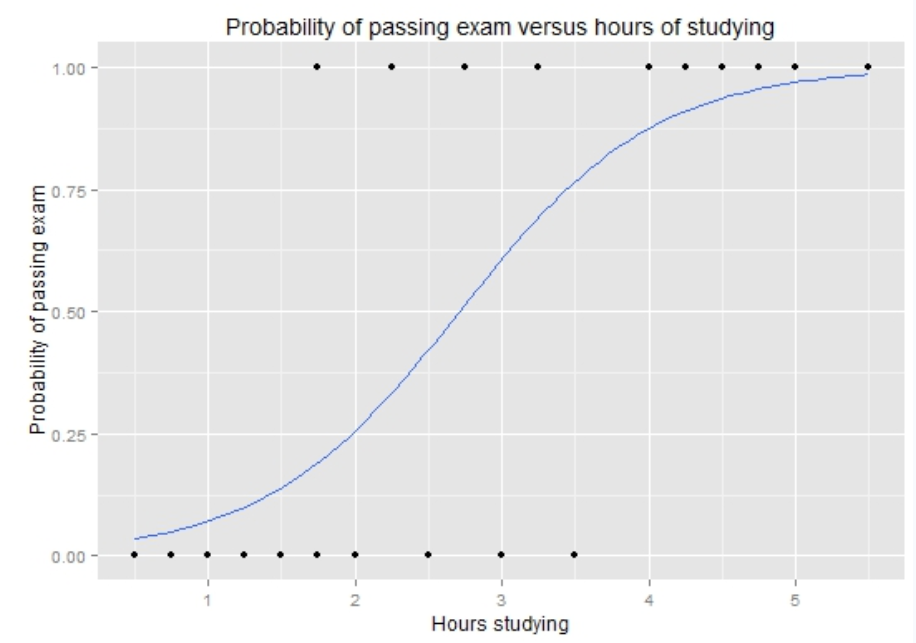
The figure below shows that the odds of passing the exam increases as the number of study hours increases.
- For example, students who study very little have a low odds of passing.
- If a student studies around 2 hours, the odds of passing is still relatively low, around 25%.
- Around 3 hours of studying, the odds gets close to 50%.
- If a student studies around 4 hours, the odds of passing becomes much higher, close to 85–90%.
- If a student studies around 5 or 6 hours, the odds becomes very close to 100%.
- This means that studying more hours is associated with a higher odds of passing the exam.
Logistic regression specifics
- [[Logistic regression]] table provides:
- [[Odds ratio]]: The effect of each factor on the odds of the outcome variable happening. For example, every 1 additional hour of studying increases the odds of passing the exam by about 4.2 times.
- Odds ratios are interpreted differently from linear regression coefficients.
- An odds ratio greater than 1 means the factor variable increases the odds of the outcome (OR > 1 is positive).
- An odds ratio less than 1 means the factor decreases the odds of the outcome (OR < 1 is negative).
- [[Standard error]]: The margin of uncertainty around each odds ratio. Smaller standard errors mean more precise estimates. Standard errors are right under the odds ratios in parentheses.
- Odds ratios are interpreted differently from linear regression coefficients.
- [[Standardized odds ratio]]: The odds ratio rescaled to allow comparison across factors regardless of their units.
- This is useful because different variables are measured differently.
- Age is measured in years.
- Education is measured in years.
- Income may be measured in dollars.
- Occupational prestige may be measured with a score.
- Standardized odds ratios help us compare which factor has a stronger relative contribution.
- This is useful because different variables are measured differently.
- [[p-value]]: The probability that the observed coefficient is due to chance. A p-value less than 0.05 is considered statistically significant.
- [[Tjur R-squared]]: The Tjur R-squared value shows whether adding additional factor variables improve the explanatory power of regression model or not. The adjusted R-squared should be reported as a percentage.
- [[Odds ratio]]: The effect of each factor on the odds of the outcome variable happening. For example, every 1 additional hour of studying increases the odds of passing the exam by about 4.2 times.
Example: Passing the exam
-
Here's what a logistic regression table looks like:
-
Passing the exam
-
Factors Odds Ratios std. OR p (Intercept) 0.03
(0.01)0.90
(0.03)0.001* Drinking coffee before exam 1.08
(0.12)1.03
(0.04)0.430 Hours of studying 4.20
(0.35)2.40
(0.12)0.001* Having a full-time job 0.45
(0.08)0.70
(0.05)0.001* Observations 500 R² Tjur 0.312 -
Which factors are significant and which one is nonsignificant?
- Hours of studying and Having a full-time job are significant (p < 0.05, ***)
- Drinking coffee before exam is nonsignificant; it has no effect on passing the exam (p > 0.05)
-
Which factor is positive and which one is negative?
- Hours of studying is positive (p < 0.05 and OR > 1; 4.20)
- Having a full-time job is negative (p < 0.05 and OR < 1; 0.45)
-
-
-
-
How to interpret positive odd ratio (OR)?
- An hour increase in studying increases the odds of passing the exam by 4.20 times.
- How to interpret negative odd ratio (OR)?
- Having a full-time job decreases the odds of passing the exam by 2.22 times compared to not having a full-time job.
- We see 0.45 odd ratio on the table.
- When reporting negative odd ratios, we divide 1 by the negative odd ratios and standardized odd ratios.
- Type “calculator” on Google
- Divide 1 by the odd ratios and standardized odd ratios
- 1 / 0.45 = 2.22
- 1 / 0.70 = 1.43
- When reporting negative odd ratios, we divide 1 by the negative odd ratios and standardized odd ratios.
- We see 0.45 odd ratio on the table.
- If we included "Not having a full-time job" to the model, instead of `Having a full-time job", we'd have this table:
-
Passing the exam
-
Factors Odds Ratios std. OR p (Intercept) 0.03
(0.01)0.90
(0.03)0.001* Drinking coffee before exam 1.08
(0.12)1.03
(0.04)0.430 Hours of studying 4.20
(0.35)2.40
(0.12)0.001* Not having a full-time job 2.22
(0.08)1.43
(0.05)0.001* Observations 500 R² Tjur 0.312
-
-
- Having a full-time job decreases the odds of passing the exam by 2.22 times compared to not having a full-time job.
GSS example: Predicting perceiving as higher class
- Logistic regression analysis will answer the following question:
- Do factor variables significantly determine the odds of being a higher class? In other words, do they significantly increase or decrease the odds of being a higher class?
- If so, what is the contribution of each factor variable on the odds of being a higher class?
- If so, what is the strength of each factor variable’s contribution on the odds of being a higher class?
- Do factor variables significantly determine the odds of being a higher class? In other words, do they significantly increase or decrease the odds of being a higher class?
Find the variables in Variables in GSS page
-
In this analysis, we propose a cause-and-effect relationship in which these factor variables may affect (increase or decrease) the odds of being a higher class.
-
flowchart LR
subgraph C0[Continuous factor variable]
    direction TB
    A[Education]
end

subgraph D0[Dummy factor variables]
    subgraph I0[Sex]
        direction TB
        I1[Being male]
        I2[Being female]
    end

    subgraph M0[Race]
        direction TB
        M1[Being white]
        M2[Being nonwhite]

    end
end

subgraph O0[Dummy outcome variable]
    E[Class<br><br>1: Perceiving as higher class <br><br> 0: Perceiving as lower class]
end

A -.->|May affect| E
I0 -.->|May affect| E
M0 -.->|May affect| E
-
-
We want to make sure that
educis a continuous variable or usable ordinal variables (Ordinal ✅), and need to see the values of categorical variables for dummy variable codes (both outcome and factor variables).-
Variable name Variable label Variable type Question wording and response categories classRespondents' subjective class identification Ordinal ✅ If you were asked to use one of four names for your social class, which would you say you belong in?
(1: Lower class; 2: Working class; 3: Middle class; 4: Upper class)educRespondents' education in years Continuous What is the highest year of school you completed?
(Min: 0, Max: 20)sexRespondents' sex Binary What's your sex?
(1: Male; 2: Female)race
From: Variables in GSSRespondents' race Nominal What's your race?
(1: White; 2: Black; 3: Other)
-
-
First, let's create the dummy variables first.
- We'll create dummy variables for:
- The outcome variable,
class, and - The factor variables:
sexandrace.
- The outcome variable,
- We'll create dummy variables for:
[[Dummy variable]]: Categorical (nominal/ordinal) #code
- We'll merge "1: Lower class" and "2: Working class", and call it
lowerclass; - We'll merge "3: Middle class" and "4: Upper class" and call it
higherclass. - We'll include
higherclassin the model, andlowerclasswill be our omitted comparison category. -
[[Model code]]
-
[[Working code]]
-
- Line 1: We put the new variable name here:
lowerclasshere ➜dummyvar1- It's better to write something simple and memorable, thus
lowerclass.
- It's better to write something simple and memorable, thus
- Line 2: We put the original variable that we want to create a dummy variable.
classhere ➜orig_var- Since we want to merge
1"Lower class" and2"Working class", we putgss$class == 1, 1, 0 | gss$class == 2, 1, 0here ➜gss$orig_var == value, 1, 0 | gss$orig_var == value, 1, 0- The whole code with the last
1, 0means:- "if class is 1 or 2, create a new variable called lowerclass, assign them “1”, and assign the rest “0”".
- The whole code with the last
- Line 3: We write this new dummy variable's variable label here "
Perceiving as lower class" - Line 5: We put the new variable name here:
higherclasshere ➜dummyvar1- It's better to write something simple and memorable, thus
higherclass.
- It's better to write something simple and memorable, thus
- Line 6: We put the original variable that we want to create a dummy variable.
classhere ➜orig_var- Since we want to merge
3"Middle class" and4"Upper class", we putgss$class == 3, 1, 0 | gss$class == 4, 1, 0here ➜gss$orig_var == value, 1, 0 | gss$orig_var == value, 1, 0- The whole code with the last
1, 0means:- "if class is 3 or 4, create a new variable called higherclass, assign them “1”, and assign the rest “0”".
- The whole code with the last
- Line 7: We write this new dummy variable's variable label here "
Perceiving as higher class" - Creating a dummy variable is in a way recoding a variable, and thus creating a new variable.
- [[Find this working code in the R script file]].
- [[Highlighting and running]] this code will create two more variables,
lowerclass, andhigherclass.
- [[Highlighting and running]] this code will create two more variables,
- [[Find this working code in the R script file]].
- Line 1: We put the new variable name here:
-
[[Dummy variable]]: Categorical (binary) #code
- We'll create a dummy variable for
male; - We'll create a dummy variable for
female; - We'll include
femalein the model, andmalewill be our omitted comparison category. -
[[Model code]]
-
[[Working code]]
-
- Line 1: We put the new variable name here:
malehere ➜dummyvar1- It's better to write something simple and memorable value label here, thus
male.
- It's better to write something simple and memorable value label here, thus
- Line 2: We put the original variable that we want to create a dummy variable.
sexhere ➜orig_var- since
1is "male" in GSS dataset, we put1here ➜value- The whole code with the last
1, 0means:- "if sex is 1, create a new variable called male, assign them “1”, and assign the rest “0”".
- The whole code with the last
- Line 3: We write this new dummy variable's variable label here "
Being male" - Line 5: We put the new variable name here:
femalehere ➜dummyvar2- It's better to write something simple and memorable here, thus
female.
- It's better to write something simple and memorable here, thus
- Line 6: We put the original variable that we want to create a dummy variable.
sexhere ➜orig_var- since
2is "female" in GSS dataset, we put2here ➜value- The whole code with the last
1, 0means:- "if sex is 2, create a new variable called female, assign them “1”, and assign the rest “0”".
- The whole code with the last
- Line 7: We write this new dummy variable's variable label here "
Being female" - Creating a dummy variable is in a way recoding a variable, and thus creating a new variable.
- [[Find this working code in the R script file]].
- [[Highlighting and running]] this code will create two more variables,
maleandfemale.
- [[Highlighting and running]] this code will create two more variables,
- [[Find this working code in the R script file]].
- Line 1: We put the new variable name here:
-
[[Dummy variable]]: Categorical (nominal/ordinal) #code
- We'll keep "1: White" and call it
white; - We'll merge "2: Black" and "3: Other" and call it
nonwhite. - We'll include
nonwhitein the model, andwhitewill be our omitted comparison category. -
[[Model code]]
-
[[Working code]]
-
- Line 1: We put the new variable name here:
whitehere ➜dummyvar1- It's better to write something simple and memorable, thus
white.
- It's better to write something simple and memorable, thus
- Line 2: We put the original variable that we want to create a dummy variable.
racehere ➜orig_var- since
1is "white" in GSS dataset, we put1here ➜value- The whole code with the last
1, 0means:- "if race is 1, create a new variable called white, assign them “1”, and assign the rest “0”".
- The whole code with the last
- Line 3: We write this new dummy variable's variable label here "
Being white" - Line 5: We put the new variable name here:
nonwhitehere ➜dummyvar1- It's better to write something simple and memorable, thus
nonwhite.
- It's better to write something simple and memorable, thus
- Line 6: We put the original variable that we want to create a dummy variable.
racehere ➜orig_var- Since we want to merge
2"Black" and3"Other", we putgss$race == 2 | gss$class == 3, 1, 0here ➜gss$orig_var == value | gss$orig_var == value, 1, 0- The whole code with the last
1, 0means:- "if race is 2 or 3, create a new variable called nonwhite, assign them “1”, and assign the rest “0”".
- The whole code with the last
- Line 7: We write this new dummy variable's variable label here "
Being nonwhite" - Creating a dummy variable is in a way recoding a variable, and thus creating a new variable.
- [[Find this working code in the R script file]].
- [[Highlighting and running]] this code will create two more variables,
whiteandnonwhite.
- [[Highlighting and running]] this code will create two more variables,
- [[Find this working code in the R script file]].
- Line 1: We put the new variable name here:
-
[[Logistic regression]] #code
-
[[Model code]]
-
[[Working code]]
-
- Line 1: We put
higherclasshere ➜outcome_here;educhere ➜factor1_here;femalehere ➜factor2_here;nonwhitehere ➜factor3_here.- Outcome variable variable first; then, factor variables separated by plus (+).
- Line 2: Check the first argument:
model1. If this is model1, then we should use model1 here- This needs to be
model1, otherwise this code won't work.- [[Find this working code in the R script file]].
- [[Highlighting and running]] this code will generate the output below (which will appear in the [[viewer tab]] of RStudio).
- [[Find this working code in the R script file]].
- This needs to be
- Line 1: We put
-
[[Logistic regression]] #output
-
Perceiving as higher class
-
Factors Odds Ratios std. OR p (Intercept) 0.04
(0.01)0.94
(0.03)0.001*** Respondents' education in years 1.26
(0.02)1.96
(0.08)0.001*** Being female 0.97
(0.07)0.99
(0.03)0.693 Being nonwhite 0.66
(0.05)0.82
(0.03)0.001*** Observations 3831 R² Tjur 0.102
-
[[Logistic regression]] with dummy variables #interpretation
-
Logistic regression with dummy variables interpretation sample
- First section: The significance levels
- Respondents' education in years and being nonwhite are statistically significant factors of perceiving as higher class since the p values are less than 0.05. Being female is not a statistically significant factor of perceiving as higher class since the p value is greater than 0.05.
- Second section: The explanation of odd ratios
- A year increase in respondents' education in years increases the odds of perceiving as higher class by 1.26 times.
- Being nonwhite decreases the odds of perceiving as higher class by 1.51 times compared to being white.
- Third section: The explanation of standardized odd ratios
- The strongest factor of perceiving as higher class is having low socio-economic status (std. Coeff=-0.35), followed by respondents' education in years (std. Coeff=0.16), being male (std. Coeff=0.16), having moderate socio-economic status (std. Coeff=-0.10), being married (std. Coeff=0.09), and being single (std. Coeff=-0.08).
- Fourth section: The explanation of Tjur R-squared
- The Tjur R-squared value indicates that 10.2% of the variation in perceiving as higher class can be explained by respondents' education in years and being nonwhite.
- First section: The significance levels
-
Logistic regression with dummy variables interpretation template
- First section: The significance levels
- [[Variable label]] of significant [[factor variable]] 1, variable label of significant factor variable 2, variable label of significant factor variable 3... are statistically significant factors of variable label of [[outcome variable]] since the p values are less than 0.05. [If any]: variable label of significant factor variable 4, variable label of significant factor variable 5... is(are) not statistically significant factor(s) of variable label of outcome variable since the p value(s) is(are) greater than 0.05.
- Second section: The explanation of odd ratios
- A [unit/day/score,year,dollar (unit of analysis of continuous factor variable1)] increase in variable label of significant continuous factor variable 1 increases/decreases the odds of variable label of outcome variable by odd ratio + times.
- Variable label of included dummy variable 1 increases/decreases the odds of variable label of outcome variable by odd ratio + times compared to omitted dummy variable 1.
- Variable label of included dummy variable 2 increases/decreases the odds of variable label of outcome variable by odd ratio + times compared to omitted dummy variable 2.
- Third section: The explanation of standardized odd ratios
- The strongest factor of variable label of outcome variable is the variable label of first strongest factor variable (std. OR=0.xx), followed by variable label of second strongest factor variable (std. OR=0.xx), and variable label of third strongest factor variable (std. OR=0.xx)...
- Fourth section: The explanation of Tjur R-squared
- The [[Tjur R-squared]] value indicates that Tjur R-squared value of the variation in variable label of outcome variable can be explained by variable label of significant factor variable 1, variable label of significant factor variable2, variable label of significant factor variable3...
- First section: The significance levels
-
Interpretation explanation
- First section: The significance levels
- Mention which variables variable labels are statistically significant, and which variables are statistically nonsignificant (if any). Variables with at least one asterisk (*) are statistically significant.
- Second section: The explanation of coefficients
- Mention how significant factor variables increase or decrease the value of the outcome variable, using "Coefficients" (Coeff. column).
- When reporting the coefficients of continuos variables, ensure that the sentence includes the unit of analysis (one unit, a day, a score, a year, a dollar, etc.) of both the factor variables and the outcome variable.
- When reporting the coefficients of dummy variables, ensure that the sentence includes omitted - comparison category.
- Note: Do not mention nonsignificant variables here.
- Third section: The explanation of standardized coefficients
- Mention the strongest factor variables of the outcome variable using the "Standardized coefficients" (Std. Coeff. column) in order. Only mention the statistically significant ones. "Standardized coefficient" is an absolute number, which means -.56 is stronger than .45.
- Note: Do not mention nonsignificant variables here.
- Mention the strongest factor variables of the outcome variable using the "Standardized coefficients" (Std. Coeff. column) in order. Only mention the statistically significant ones. "Standardized coefficient" is an absolute number, which means -.56 is stronger than .45.
- Fourth section: The explanation of adjusted R-squared
- Report the Tjur R-squared value as a percentage with the statistically significant variables.
- Note: Do not mention nonsignificant variables here.
- Report the Tjur R-squared value as a percentage with the statistically significant variables.
- First section: The significance levels