03. Descriptive statistics
Module items
R Script file code
-
[[Copy the code]] below ➜ Paste into [[RStudio console]] ➜ Hit Enter
-
source(url("https://raw.githubusercontent.com/ttezcann/ssric-reg/refs/heads/main/docs/assets/attachments/data/0-packages-data.R")); (function(f="03-descriptive.R"){if(!file.exists(f)){download.file("https://raw.githubusercontent.com/ttezcann/ssric-reg/refs/heads/main/docs/assets/attachments/modules/03.-descriptive-statistics/03-descriptive.R",f,mode="wb");file.edit(f)}else{download.file("https://raw.githubusercontent.com/ttezcann/ssric-reg/refs/heads/main/docs/assets/attachments/modules/03.-descriptive-statistics/03-descriptive.R",gsub(".R","-original.R",f),mode="wb");file.edit(gsub(".R","-original.R",f))}})()- When this R script file opens in a new tab, [[Save R script file|save your previous R script file(s)]], and
- Close the previous tabs (R Script files), which you can find later in the [[Files tab]].
- When this R script file opens in a new tab, [[Save R script file|save your previous R script file(s)]], and
-
Lab assignment
Sample lab assignment
Sample: Descriptive statistics
Suggested reading
Fisher, Murray J., and Andrea P. Marshall. 2009. “Understanding Descriptive Statistics.” Australian Critical Care 22(2):93–97. doi: 10.1016/j.aucc.2008.11.003.
Learning outcomes
- Differentiate between categorical (binary, nominal, ordinal) and continuous variables based on their response categories
- Learn how to generate and interpret a frequency table and a bar graph for a categorical variable
- Learn how to generate and interpret a descriptive table and a histogram for a continuous variable
- Learn how to generate and interpret a bar graph for a categorical variable and a histogram for a continuous variable
- Practice model codes and working codes structure
What is [[variable]]?
- A variable is any characteristics, number, or quantity that can be measured or counted.
- It represents any piece of information we know about our subjects (e.g., individuals).
[[Content of the variable]]
- Based on the content of the variable, what it asks, there are two types of variables:
- [[Demographic variables]]
- Questions about respondents’ demographics are called demographic variables or control variables, such as education, age, gender, income, race/ethnicity.
- [[Contextual variables]]
- Questions about respondents’ attitudes, beliefs, or behaviors, are called contextual variables, such as happiness, environmental attitudes, friendship networks, social trust.
- [[Demographic variables]]
[[Types of the variable]]
- Based on the way it is asked and the nature of it;
- There are two main types of the variables, which are important for data analysis.
- They could be:
- Categorical, or
- Continuous.
- We need to know what kind of variable we're analyzing, because analysis techniques are different for each.
- They could be:
- There are two main types of the variables, which are important for data analysis.
[[Categorical]] variables
- Categorical variables take on values that are labels.
- Variables are categorical when respondents are provided responses to choose from.
-
Values are NOT real numbers.
-
In the response categories below,
(3) nois not triple of(1) yes.-
Categorical variable
- Do you like coffee?
- Yes
- Not much
- No
- Do you like coffee?
-
-
Depending on the response categories, such as
(1) yes, (2) not much, (3) no, there are three different categorical variables, described as below.
-
[[Binary]] variables
- Binary variables include two responses.
-
Examples include true-or-false and yes-or-no questions.
-
Binary variable
Are you satisfied with your current job?
(1) yes
(2) no
-
-
[[Nominal]] variables
- Nominal variables have more than two responses to choose from.
-
One more response category makes a binary variable a nominal.
-
Nominal variable
What is your job status?
(1) working full time
(2) working part time
(3) unemployed
-
-
[[Ordinal]] variables
- Ordinal variables have responses that can be put in a logical and hierarchical order.
- Values are rank ordered.
- For example, below there's a logical order from
(1) not satisfied at allto(5)very satisfied
- For example, below there's a logical order from
- The differences between the responses are unknown or inconsistent.
- For example,
(2) not satisfiedis not double of(1) not satisfied at all.
- For example,
-
We do not treat the values of categorical variables as real numbers.
-
Ordinal variable
How satisfied are with your current job?
(1) not satisfied at all
(2) not satisfied
(3) more or less
(4) satisfied
(5) very satisfied
-
- Values are rank ordered.
[[Continuous]] variables
- Continuous variable values represent real numbers.
- When respondents are NOT provided options to choose from.
-
Here, the age of 20 is double of the age of 40, so it is continuous.
-
Continuous variables
- What is your age?
- 20, 40, 48, 80
- What is your income?
- $10,000, $30,000, $48,500
- How many years of schooling did you complete?
- 10, 15, 17, 20
- What is your age?
-
Determining variable type exercise
-
Determining the type of variable is important because different analysis techniques are used depending on the variable type.
- Some questions from different surveys will be shown.
- We will determine if they are;
- Categorical (If so, binary, nominal, or ordinal)
- Continuous
-
1. Youth Participatory Politics Survey Project
-
"I am interested in political issues. Do you..."
-
1 2 3 4 Strongly disagree Disagree Agree Strongly agree -
Show the answer
- Categorical (Ordinal):
- The responses can be put in a logical, hierarchical order: from strongly disagree to strongly agree.
- We do not treat these as real numbers.
- Categorical (Ordinal):
-
-
-
-
2. American Health Values Survey
-
"During the last 5 years do you think your health in general has gotten better, gotten worse or stayed about the same?"
-
1 2 3 Better Worse Stayed about the same -
Show the answer
- Categorical (Nominal)
- There are more than two categories, so it is not binary.
- These three answers do not form a clear rank-ordered scale. "Better" and "worse" point in opposite directions, and "stayed about the same" is not naturally in the middle of a single ordered ladder the way "disagree → agree" is.
- Categorical (Nominal)
-
-
-
-
3. European Social Survey
-
"And at what age, approximately, would you say men reach old age?" Type in age ...
-
Show the answer
- Continuous:
- Respondents are not given options to choose from; they type in a value.
- Age is a real number. For example, 70 is not a label; it has meaningful numeric relationships (e.g., 35 is half of 70).
- Continuous:
-
-
-
4. Latino National Survey
-
"Now I want to ask you about a particular child. Think about your child who had the most recent birthday and was enrolled in school last year. For the following questions please focus on this child." Is this child enrolled in public or private school?
-
Value Label 1 Yes 2 No -
Show the answer
- Categorical (Binary):
- Respondents choose from two fixed responses
- Two response categories makes this binary, which is a type of categorical variable.
- Categorical (Binary):
-
-
-
-
5. National Surveys on Energy and the Environment
-
"How likely is it that weather in the US is influenced by global warming?"
-
1 2 3 4 Very likely Somewhat likely Not likely Not likely at all -
Show the answer
- Categorical (Ordinal):
- The answers can be put in a logical order from most likely to least likely.
- We do not treat these as real numbers.
- Categorical (Ordinal):
-
-
-
-
6. Latino Second Generation Study
-
"What is the highest level of school your father has completed?"
-
Value Label 1 No formal education 2 1st, 2nd, 3rd, or 4th grade 3 5th or 6th grade 4 7th or 8th grade 5 9th grade 6 10th grade 7 11th grade 8 12th grade NO DIPLOMA 9 HIGH SCHOOL GRADUATE - high school DIPLOMA or the equivalent (GED) 10 Some college, no degree 11 Associate degree 12 Bachelor's degree 13 Master's degree 14 Professional or Doctorate degree -
Show the answer
- Categorical (Ordinal):
- The categories can be put in a logical, hierarchical order from lowest to highest education.
- Values are rank ordered, but they are not equal real numbers: (8) 12th grade no diploma is not eight times (1) No formal education.
- Categorical (Ordinal):
-
-
-
-
7. National Survey on Drug Use and Health
-
"About how many days out of 365 in the past 12 months were you totally unable to go to school or work or carry out your normal activities"
Number of days ...-
Show the answer
- Continuous:
- Respondents express their responses in a number of days; they are not picking from a fixed set of labels.
- The value is a real number: 10 days is half of 20 days, and counts can be added and compared meaningfully as numbers.
- Continuous:
-
-
-
8. New Family Structures Study
-
"Thinking about your main job (for pay), which of the following sectors best describes your job?"
-
1 2 3 4 5 Private sector Federal government State or Local government Non-profit sector Self-employed -
Show the answer
- Categorical (Nominal):
- Respondents choose from more than two fixed categories
- These sectors cannot be put in a single logical rank order: private sector is not "more" or "less" than federal government in the way "satisfied" is more than "not satisfied."
- Categorical (Nominal):
-
-
-
-
9. Police-Public Contact Survey
-
"In the past 12 months, have you been involved in a traffic accident in which the police came to the scene?"
-
1 2 Yes No -
Show the answer
- Categorical (Binary):
- Respondents choose from two responses: yes or no.
- Categorical (Binary):
-
-
-
-
10. Well-Being and Basic Needs Survey, United States
-
"The following questions ask about you and your household. Are you now..."
-
1 2 3 4 5 Married Widowed Divorced Separated Never married -
Show the answer
- Categorical (Nominal):
- Respondents choose from more than two fixed categories.
- Marital statuses are distinct labels. There is no single hierarchical order that ranks all five in the same way an agreement scale does. (Widowed is not "more" than divorced in a consistent numeric sense.)
- Categorical (Nominal):
-
-
-
[[Summary statistics]]
- Summary statistics is used to obtain quick summaries of variables.
- For [[categorical]] variables, we use:
- [[Frequency table]]
- [[Bar graph]]
- For [[continuous]] variables, we use:
- [[Descriptive table]]
- [[Histogram graph]]
- For [[categorical]] variables, we use:
[[Frequency table]]
- Frequency table is used to create a table showing the count and percentage for a single [[categorical]] variable.
- The “Frequencies” (
frq) code counts up how many times a response of a variable appears and calculates the percentage. -
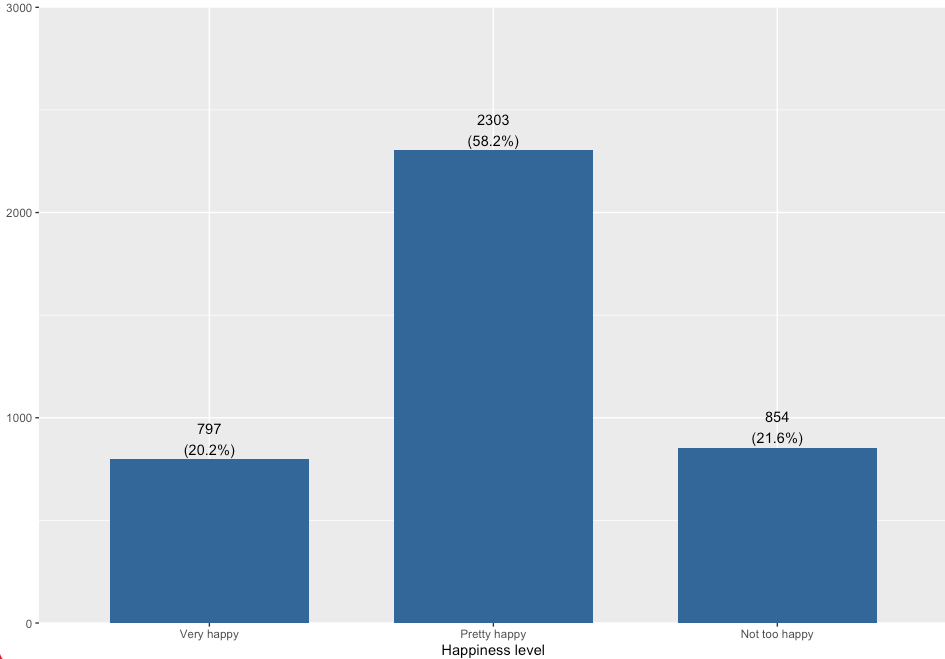
Happiness level (Variable label)
-
value value label frq raw.prc valid.prc cum.prc 1 Very happy 797 19.99 20.16 20.16 2 Pretty happy 2303 57.78 58.24 78.40 3 Not too happy 854 21.42 21.60 100.00 NA NA 32 0.80 NA NA
-
- The “Frequencies” (
Find the variable in Variables in GSS page
- We will create a frequency table for the
finaltervariable, then interpret it. - We want to make sure that
finalteris a categorical variable. -
[[Search]] the variable name in Variables in GSS page. We see that this is a [[nominal]], so a [[categorical]] variable.
-
Variable name Variable label Variable type Question wording and response categories finalterPerceived change in financial situation Nominal During the last few years, has your financial situation been getting better, worse, or has it stayed the same?
(1: Better; 2: Worse; 3: Stayed same)
-
[[Frequency table]] #code
-
[[Model code]]
-
-
[[Working code]]
-
- Line 1: We put
finalterhere ➜variable_here.- [[Find this working code in the R script file]].
- [[Highlighting and running]] this code will generate the output below (which will appear in the [[viewer tab]] of RStudio).
- [[Find this working code in the R script file]].
- Line 1: We put
-
[[Frequency table]] #output
-
Perceived change in financial situation (Variable label)
-
value value label frq raw.prc valid.prc cum.prc 1 Better 1175 29.48 29.70 29.70 2 Worse 1258 31.56 31.80 61.50 3 Stayed same 1523 38.21 38.50 100.00 NA NA 30 0.75 NA NA
-
[[Frequency table]] #interpretation
-
Frequency table interpretation sample
The perceived change in financial situation variable shows that 29.70% of the respondents think their financial situation has gotten better; 31.80% of the respondents think their financial situation has gotten worse; and 38.50% of the respondents think their financial situation has stayed same during the last few years.
-
Frequency table interpretation template
The [[variable label]] variable shows that xx.xx% of the respondents are / have / feel / think / said / reported [[value label]] 1, xx.xx% of the respondents are / have / feel / think said / reported value label 2, xx.xx% of the respondents are / have / feel / think / said / reported value label 3...
-
Interpretation explanation
- After the [[variable label]], we add the word of "variable" in your interpretation:
- "The Perceived change in financial situation variable shows that..."
- Depending on the variable, we need to tweak some parts of the interpretation.
- For example, "15.4% of the respondents are/have/feel/think/said/reported" etc.
- We always interpret the valid percentage column (valid.prc) as it excludes the missing data (NA), showing 30 respondents who did not respond to this question.
- After the [[variable label]], we add the word of "variable" in your interpretation:
[[Bar graph]]
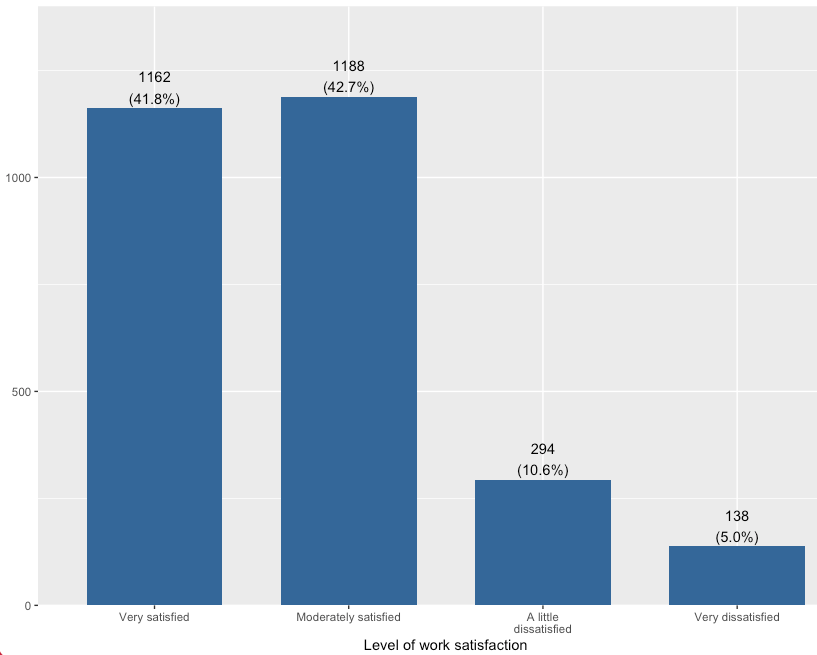
- A bar graph is a visual representation of [[frequency table]].
- It provides the same information as frequency table. The interpretation is same as frequency table interpretation.
- It provides the same information as frequency table. The interpretation is same as frequency table interpretation.
Find the variable in Variables in GSS page
- We will create a bar graph for the
satjobvariable, then interpret it. - We want to make sure that
satjobis a categorical variable. -
[[Search]] the variable name,
satjob, in Variables in GSS page. We see that this is a [[ordinal]], so a [[categorical]] variable.-
Variable name Variable label Variable type Question wording and response categories satjobLevel of work satisfaction Ordinal On the whole, how satisfied are you with the work you do?
(1: Very satisfied; 2: Moderately satisfied; 3: A little dissatisfied; 4: Very dissatisfied)
-
[[Bar graph]] #code
-
[[Model code]]
-
[[Working code]]
-
- Line 1: We put
satjobhere ➜variable_here.- [[Find this working code in the R script file]].
- [[Highlighting and running]] this code will generate the output below (which will appear in the [[plots tab]] of RStudio).
- [[Find this working code in the R script file]].
- Line 2: Instead of
bar, we can use other arguments, such asdensity,boxorline. -
Line 3: We can change the bar color here. Replace the hex color code ➜
"#336699"-
Finding colors
- Browse and copy hex color codes at https://coolors.co/palettes/trending
-
- Line 1: We put
-
[[Bar graph]] #output
[[Bar graph]] #interpretation
-
Bar graph interpretation sample
The level of work satisfaction variable shows that 41.8% of the respondents are very satisfied; 42.7% of the respondents are moderately satisfied; 10.6% of the respondents are a little dissatisfied, and 5% of the respondents are very dissatisfied with the work they do.
-
Bar graph interpretation template
The [[variable label]] variable shows that xx.xx% of the respondents are / have / feel / think / said / reported [[value label]] 1, xx.xx% of the respondents are / have / feel / think said / reported value label 2, xx.xx% of the respondents are / have / feel / think / said / reported value label 3...
-
Interpretation explanation
- After the variable label, we add the word of "variable" in your interpretation:
- "The level of work satisfaction variable shows that..."
- Depending on the variable, we need to tweak some parts of the interpretation.
- For example, "15.4% of the respondents are/have/feel/think/said/reported" etc.
- Bar graphs already show the valid percentage (valid.prc).
- After the variable label, we add the word of "variable" in your interpretation:
[[Descriptive table]]
-
Descriptive table is used to create a table showing the mean and standard deviation for a single [[continuous]] variable.
-
The “Descriptives” (
descr) code is used to determine:- [[Mean]]:
- The arithmetic average of a distribution, calculated by summing all observed values and dividing by the number of observations.
- [[Standard deviation]] (sd):
- A measure of dispersion that quantifies the average distance of individual observations from the mean.
- A smaller standard deviation indicates that values are concentrated near the mean, while a larger standard deviation reflects greater variability across observations.
- A measure of dispersion that quantifies the average distance of individual observations from the mean.
- [[Mean]]:
-
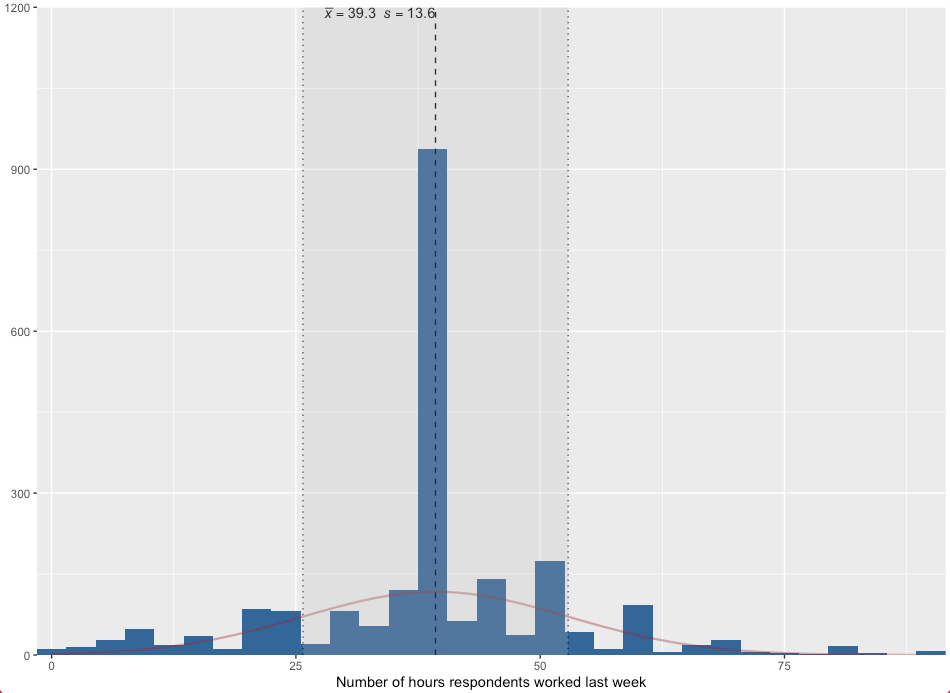
variable variable label n NA.prc mean sd hrs1 Number of hours respondents worked last week 2201 44.78 39.29 13.57
-
Find the variable in Variables in GSS page
- We will create a descriptive table for the
educvariable, then interpret it. - We want to make sure that
educis a continuous variable. We check this information in the Variables in GSS page. -
[[Search]] the variable name,
educ, in Variables in GSS page. We see that this is a [[continuous]] variable.-
Variable name Variable label Variable type Question wording and response categories educRespondents' education in years Continuous What is the highest year of school you completed?
(Min: 0, Max: 20)
-
[[Descriptive table]] #code
-
[[Model code]]
-
-
[[Working code]]
-
- Line 1: We put
educhere ➜variable_here.- [[Find this working code in the R script file]].
- [[Highlighting and running]] this code will generate the output below (which will appear in the [[viewer tab]] of RStudio).
- [[Find this working code in the R script file]].
- Line 1: We put
-
[[Descriptive table]] #output
-
variable variable label n NA.prc mean sd educ Respondents' education in years 3952 0.85 14.24 2.92
[[Descriptive table]] #interpretation
-
Descriptive table interpretation sample
The respondents' education in years variable shows that the average years of education that respondents received is 14.42, with standard deviation 2.92.
-
Descriptive table interpretation template
The [[variable label]] variable shows the average [[variable label]] of the respondents is [mean], with standard deviation [sd].
-
Interpretation explanation
- After the variable label, we add the word of "variable" in your interpretation:
- "The respondents' education in years variable shows that..."
- Depending on the variable, we need to tweak some parts of the interpretation.
- For example, "the average years of education is...", "the average weeks of working is..." etc.
- We use the mean (mean column) and standard deviation (sd column) in our interpretation.
- After the variable label, we add the word of "variable" in your interpretation:
[[Histogram graph]]
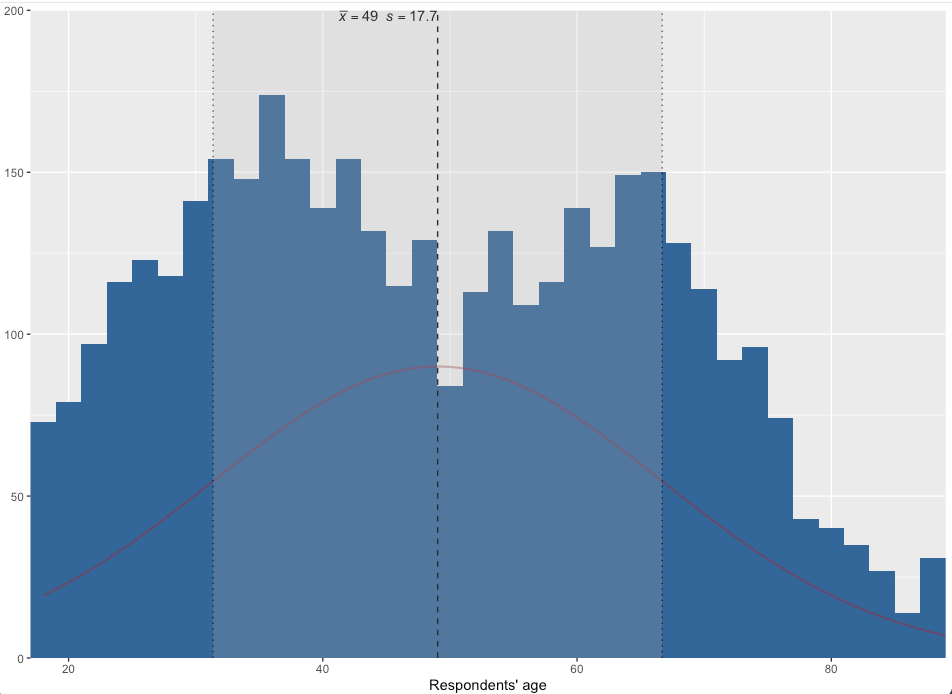
- Histogram graph is used to create a figure showing the mean and standard deviation for a single [[continuous]] variable.
- It provides the same information as descriptive table.
- It provides the same information as descriptive table.
Find the variable in Variables in GSS page
- We will create a histogram graph for the
agevariable, then interpret it. - We want to make sure that
ageis a continuous variable. -
[[Search]] the variable name,
age, in Variables in GSS page. We see that this is a [[continuous]] variable.-
Variable name Variable label Variable type Question wording and response categories ageRespondents' age Continuous What is your age?
(Min: 18, Max: 89)
-
[[Histogram graph]] #code
-
[[Model code]]
-
[[Working code]]
-
- Line 1: We put
agehere ➜variable_here.- [[Find this working code in the R script file]].
- [[Highlighting and running]] this code will generate the output below (which will appear in the [[plots tab]] of RStudio).
- [[Find this working code in the R script file]].
-
Line 3: We can change the bar and curve color here separately. Replace the hex color code for bar ➜
"#336699".Replace the hex color code for curve ➜"#9b2226"-
Finding colors
Browse and copy hex color codes at https://coolors.co/palettes/trending
-
- Line 1: We put
-
[[Histogram graph]] #output
[[Histogram graph]] #interpretation
-
Histogram graph interpretation sample
The respondents' age variable shows that the average age of the respondents is 49, with standard deviation 17.7.
-
Histogram graph interpretation template
The [[variable label]] variable shows that the average [[variable label]] of the respondents is [mean], with standard deviation [sd].
-
Interpretation explanation
- After the variable label, we add the word of "variable" in your interpretation:
- "The respondents' age variable shows that..."
- Depending on the variable, we need to tweak some parts of the interpretation.
- For example, "the average age of the respondents is...", "the average weeks of working is..." etc.
- We use the mean and standard deviation in our interpretation.
- The mean is indicated by x̄, the standard deviation is indicated by s (at the very top of the histogram graph)
- After the variable label, we add the word of "variable" in your interpretation: